Esobit Datalink is the solution to your problems
Have you ever spent hours and hours manually uploading analytical results into your LIMS? Have you ever wished for a faster way to enter data?
Time is your most valuable resource. Esobit DataLink helps you invest it better by automating the most repetitive processes and minimizing the risk of errors.
DataLink allows you to upload, transform, and send results generated by analytical instruments to your LIMS in an accurate, secure, and fast way.
Book a demo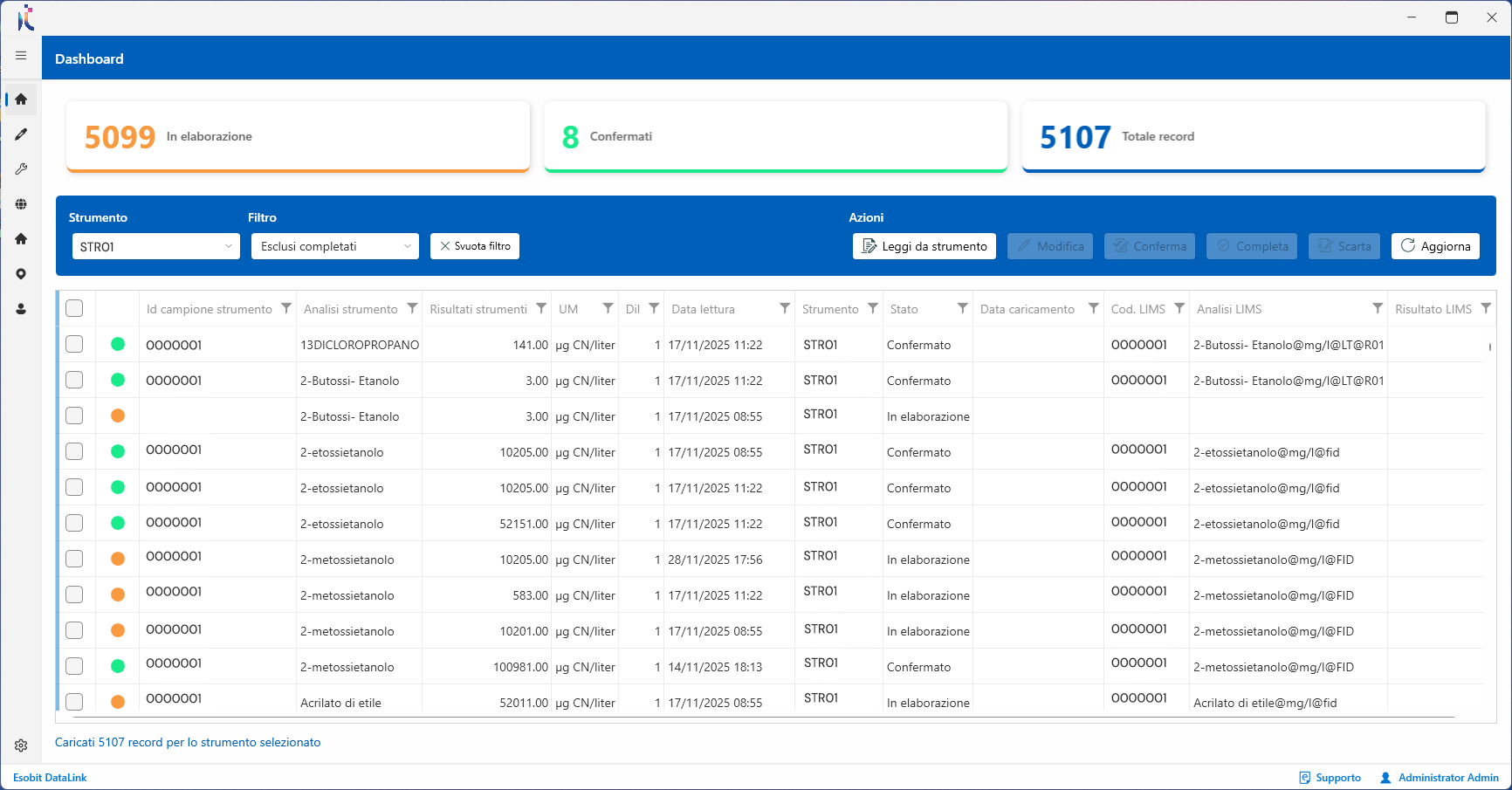
Features of Esobit Datalink
It is a flexible tool, capable of adapting to any instrument brand, model, or data format, and designed for laboratories that want to modernize their workflows without changing their existing instrumentation.


Instrument and LIMS connection
DataLink automatically imports data from any instrument and sends it to the LIMS with no manual intervention.


Clear and traceable data import
It displays all results in an organized way and records every operation, ensuring full control and traceability.


Secure and controlled data transfer.
It applies result formatting rules, verifies sample status, and prevents overwriting.

How was Esobit DataLink created?
More and more laboratories were asking us to create a tool that could channel all the data produced by analytical instruments and load it into the LIMS quickly and reliably. From this need, the Esobit team developed a custom-built software solution that revolutionizes the laboratory workflow.
Those who trusted us






Every operation is recorded in a detailed change log, ensuring compliance with audits, ISO 17025, and quality control requirements.

Instruments and operators can be organized by departments, areas, and locations, with visibility limited to what is relevant for each user.

Files (TXT, CSV, ODS, XLS, etc.) are handled and imported while maintaining consistency and control across the entire data flow to the LIMS.

Remote assistance and activation, testing with real files, customized features, and continuous Esobit support.
Every operation is recorded in a detailed change log, ensuring compliance with audits, ISO 17025, and quality control requirements.
Instruments and operators can be organized by departments, areas, and locations, with visibility limited to what is relevant for each user.
Files (TXT, CSV, ODS, XLS, etc.) are handled and imported while maintaining consistency and control across the entire data flow to the LIMS.
Remote assistance and activation, testing with real files, customized features, and continuous Esobit support.
100+
Daily connections
43+
Solutions deployed
100%%
Customer satisfaction

A specialized team for analysis laboratories
FlowLab was born from the intuition of Luca Alberigi, a chemist with over 10 years of experience in accredited environmental analysis laboratories. The goal is simple and concrete: to help laboratory technicians work better through advanced digital solutions, custom software, and tools designed to automate analytical workflows.
Discover the FlowLab services dedicated to laboratory digitalization, process optimization, and data management. Contact us to upgrade your laboratory with innovative, secure, and tailor-made solutions.
Q&A Esobit DataLink
Frequently asked questions about Esobit DataLink, the solution designed to automate the upload of instrumental analytical results into the LIMS.
What is Esobit DataLink?
Esobit DataLink is a software solution designed to automate the upload of instrumental analytical results into the LIMS. It imports results produced by laboratory instruments, transforms them according to defined rules and sends them to the LIMS in a controlled, secure and traceable way, reducing manual activities, transcription errors and management times.
Can DataLink integrate with the LIMS we already use?
Yes. DataLink is designed to connect analytical instruments with the most widely used LIMS platforms on the market, adapting to the workflows already present in the laboratory. The goal is to improve the existing process without forcing the laboratory to change software, instruments or established operating procedures.
Our instruments generate result exports in different formats: which file types can DataLink handle?
DataLink can import analytical results generated by laboratory instruments in different formats, such as TXT, CSV, ODS, XLS files and other exportable layouts. DataLink can interpret these files thanks to plugins provided directly by Esobit. The data is read, interpreted, checked and prepared for upload into the LIMS according to the rules agreed with the laboratory.
Does DataLink work with any analytical instrument?
DataLink is a flexible solution and can be configured to work with instruments from different brands, models and formats. Before activation, the type of file produced by the instrument is analyzed in order to build an import flow that is consistent with the laboratory process.
How does DataLink prevent transcription errors or data overwriting?
DataLink applies checks and validation rules before sending results to the LIMS. It can verify result formats and recognize significant figures or decimal places used to express the data. If the acceptance criteria required by the LIMS are not met, DataLink does not write data into the LIMS, preventing unwanted overwriting or inconsistent uploads.
Are operations traceable?
Yes. DataLink records the operations performed on master data and throughout the import and upload process, providing maximum control and traceability. This is essential to ensure secure and fully reconstructable management of analytical data.
Is DataLink suitable for multi-site laboratories?
Yes. DataLink can be configured to manage different instruments, operators, departments, areas and sites. Each operator has customized visibility rights and can work only on the data and functions within their area of responsibility, keeping the process organized, secure and controlled even in more complex environments.
How long does it take to activate DataLink?
Activation times are generally fast and depend on the number of instruments, file formats and integration rules required. Activation includes license installation and configuration of file conversion plugins into layouts compatible with the LIMS. Our approach is based on progressive deliveries, so the laboratory can start using the system within a short timeframe.
Is it possible to request a demo of Esobit DataLink?
Yes. You can request a demo to evaluate together with the FlowLab team how DataLink can integrate with the analytical instruments and LIMS currently used in your laboratory.

In need of a consultation?
The Esobit team is always at your disposal to help you identify the best solution for your company. Request a meeting with one of our specialists and discover with us which technology can truly make a difference for your business.
Contact Us